
Construction Management Software That Actually Fits How Sites Work
Generic tools and complex enterprise systems rarely fit how construction teams actually work. Purpose-built construction management software delivers real-time scheduling, multi-site tracking, intuitive Gantt charts, and offline access, helping mid-market firms coordinate projects, stay aligned, and keep every site moving forward.
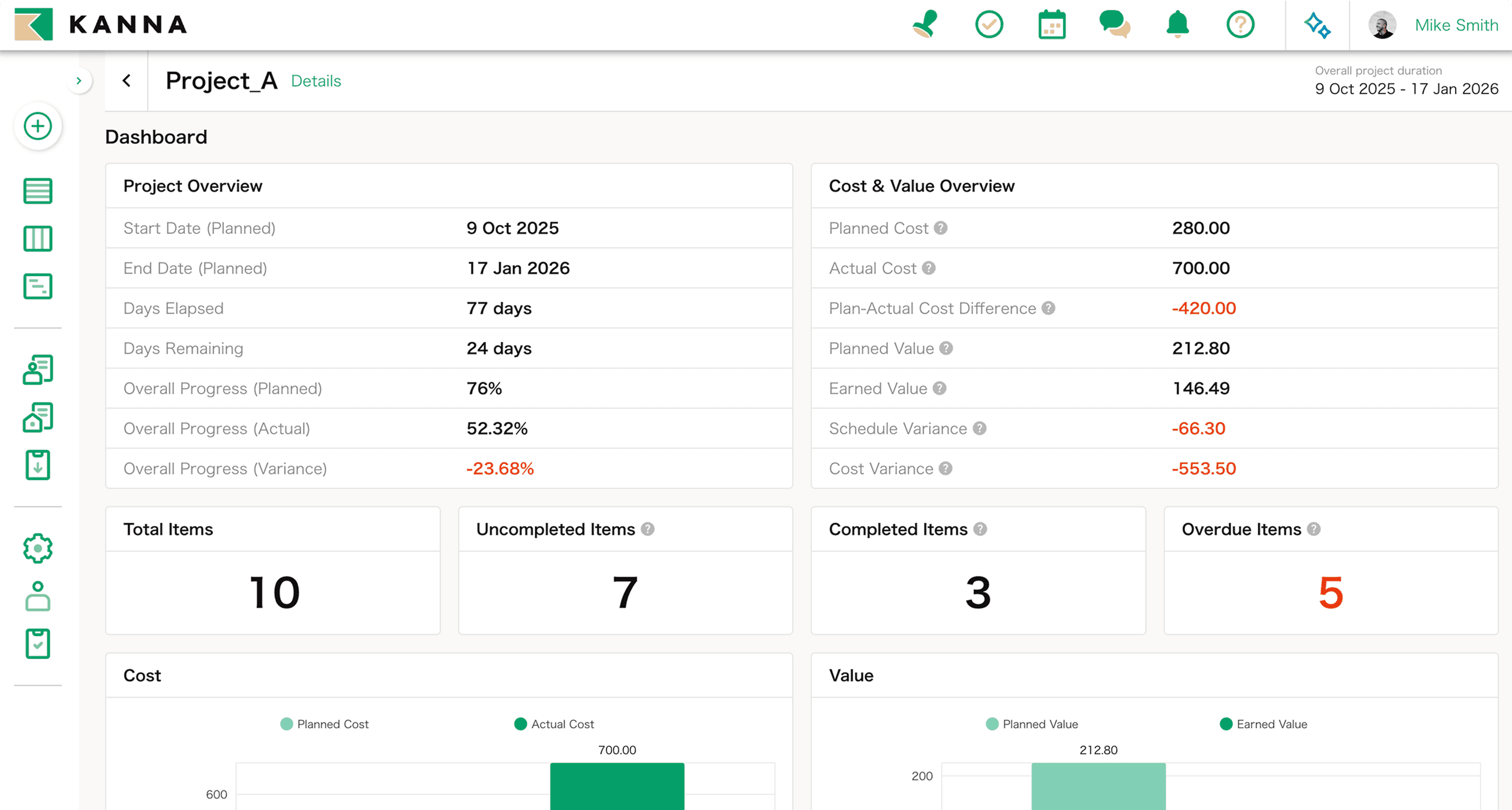
Most construction firms have already tried a project management tool that didn’t stick. Usually it’s because the tool wasn’t built for construction at all. Platforms like Monday.com, ClickUp, Jira and Asana are genuinely good software, but they’re general-purpose, which means construction teams end up shoehorning site work into a structure designed for something else entirely. At the other end of the market, Procore and Oracle Primavera are powerful, but they’re built and priced for multi-year megaprojects. For a firm running jobs measured in months rather than years, that’s a lot of complexity and cost to carry for features you’ll rarely touch.
What most mid-market construction, civil engineering and facilities firms actually need sits between those two extremes: purpose-built for construction, but sized and priced for a project that runs for six months, not six years.
What to Expect from Proper Construction Management Software
At minimum, it should give you real-time schedule visibility across every active site, a clear picture of who owns what and by when, and access from whatever device someone happens to have on them at the time, phone, tablet or desktop.
Project Tracking Across Every Site
Managing one site is straightforward. Managing eight at once, each at a different stage, is where most manual processes fall over.
Project list view. See every active project in one place, with the ability to filter by period, person responsible, or completion status. No more digging through inboxes to work out who owns what.
Project board. A drag-and-drop, Kanban-style view showing which stage each project sits in against your own operational workflow. You move a card, the status updates for everyone.
Project calendar. Every project displayed chronologically, with overdue projects flagged automatically so a missed deadline doesn’t sit unnoticed for a week.
Put together, these three views mean a manager overseeing multiple sites can get an accurate picture without phoning a single foreman or opening a single old email.
Construction Gantt Charts, Without the Excel Headache
If you’ve ever built a Gantt chart in Excel, you know the pattern: it’s accurate the day you finish it, and then someone changes something two days later and nobody’s quite sure whether the version they’re looking at is the current one.
A proper construction Gantt chart tool fixes the parts of that process that spreadsheets were never designed to handle. You build the schedule with drag-and-drop task creation, then share it in real time on the cloud so every stakeholder, including anyone outside the office, sees the same live version rather than an email attachment from last Tuesday. When a task slips, you can see the knock-on effect on the rest of the sequence immediately, rather than discovering it three weeks later. Templates from previous projects can be imported to save you rebuilding the same structure from scratch every time, and if you need to hand a copy to a client or partner who still works in Excel, you can export it straight back out.
None of this replaces good scheduling judgement. It just removes the version-control problem that makes even good scheduling fall apart in practice.
Task Management That Doesn’t Rely on One Person
A lot of construction task tracking quietly depends on one person remembering everything. That’s fine until they’re off sick or on leave.
Assigning multiple people to a single task means the work doesn’t stall the moment one person is unavailable. Due dates and automated reminders keep tasks visible without someone having to chase them manually, and because task creation works from a mobile device, a supervisor can raise and assign a task on the spot, standing on-site, rather than waiting until they’re back at a desk.
Built for the Way Construction Companies Actually Operate
Software that ignores the reality of a construction site tends to get quietly abandoned. A few things matter more here than in most industries.
Offline mode. Basements, tunnels, rural sites and anywhere else the signal drops out shouldn’t mean the tool stops working. Good construction software keeps functioning offline and syncs automatically once you’re back in range.
Configurable to your existing workflow. Every company organises projects slightly differently. Software that forces a single rigid process on everyone tends to get worked around rather than adopted properly.
Multi-language and regional support. For firms operating across borders, with international teams or subcontractors, this stops being a convenience and starts being a requirement.
Construction Management App vs Spreadsheets and Group Chats
Excel and MS Project remain the most commonly used tools in this industry, and there’s a reason for that: they’re familiar, flexible and already paid for. Where they struggle is at the point where more than a couple of people need to edit the same information at once, or where someone needs to see live status without physically opening a file. Group chats have a similar problem in the other direction: they’re fast for a quick question, but hopeless as a permanent record, since anything important tends to get buried under everything unimportant within a day or two.
A dedicated construction management app doesn’t try to replace the flexibility of Excel or the speed of a chat app. It replaces the specific job neither of them was designed for: giving everyone the same live view of a project’s status, without anyone needing to ask.
Security Built for Enterprise Clients
If you’re bidding for larger contracts, particularly with facilities management, utilities or infrastructure clients, security stops being optional. Two-factor authentication adds a second check beyond a password. Audit logs record exactly who did what and when, which matters both for internal accountability and for satisfying a client’s own compliance requirements. Device restrictions limit access to company-approved hardware, and IP address restrictions let you lock access down to specific office or site locations. These features can be turned on individually depending on what a particular contract or client demands.
Frequently Asked Questions
Can I try the Gantt chart feature before committing?
Yes, it’s included as part of the free trial, so you can build a real schedule and see how it holds up rather than judging it from a demo.
Do I need to give up my existing templates to switch?
No. Templates you already use can be imported rather than rebuilt, which is usually the difference between a tool that gets adopted and one that doesn’t.
Is the project board a separate paid feature?
No, it’s included as a standard part of the platform, not an add-on.
Can external subcontractors or partners be added as users?
Yes. External members can be invited into specific projects, with the same access to shared tasks and schedules as internal staff, without opening up the rest of your company’s data.
What happens to my Gantt chart if I need to share it with someone still using Excel?
You can export it directly as an Excel file, filtered by date range or task type, so working with partners who haven’t switched over yet isn’t a problem.
Start Your Free Trial
See your schedule, tasks and multi-site progress in one live view. No credit card required.