From raw site data to real-time answers: KANNA is now an official Claude AI Connector
Digital Transformation
AI
From raw site data to real-time answers: KANNA is now an official Claude AI Connector

KANNA is now listed in Anthropic’s Claude Connector directory, built on the Model Context Protocol (MCP). You can connect your KANNA workspace to Claude (including ChatGPT and Copilot) and ask questions about your projects in plain English. No exports. No following up someone for a report.
If you manage sites, run projects, or oversee a portfolio, the difference is speed. You get the answer when you ask, not after someone has spent an afternoon diving through the data and building a spreadsheet full of reports.
What MCP actually is
Model Context Protocol is a standard, developed by Anthropic, that lets an AI agent/assistant talk to a business system securely, without a developer writing a custom integration for every request. KANNA supports that connection, so Claude can read (and in some cases update) your project data, but only within your own KANNA permissions. If you cannot see a job in KANNA, Claude cannot see it either.
Our MCP covers two aspects.
Automation handles operational tasks inside KANNA: setting up a job, changing dates, posting a chat message.
Data analysis is the part that we feel adds the most benefit to a business. It takes the data you already capture in KANNA and turns them into an answers.
A dashboard is great for the numbers you check on a schedule. It's less useful the moment you have a specific, unplanned question, like why one job under 50% complete has already burned through most of its budget, or whether that's happening across other sites with the same subcontractor. Normally that means opening jobs one by one to piece it together. With Claude connected to KANNA, you just ask, and you can keep asking follow-up questions in the same conversation until you've actually got your answer.
Nothing changes about how data gets into KANNA. Your site teams keep logging reports and photos exactly as they do now, no new fields, no new app, no extra five minutes at the end of a shift. The only thing that changes is what happens to that data once it's in the system. The value comes from what you can now ask, not from asking your field teams to work differently. Claude only works within the permissions of the person asking. And there's no delete function in the connector. Claude can query and update, but it can't remove a record.
What this means depends on where you sit
The change is the same in every role: less manual handling of data, and a faster route to the answer.
The old way: paper notes or basic digital logs get filled out on site. Someone re-types them into a system days later. Typos creep in. A manager eventually pulls the numbers into a spreadsheet and spots a problem that happened two weeks ago.
The new way: your team captures data on site as normal. Claude reads it live, checks it against the other projects you are running, and gives you a straight answer when you ask.
For CEOs, managing directors and business owners
The issue is seldom a lack of data. The data sits across dozens of individual job records until someone has time to pull it together, and by then the margin has already slipped. Our MCP integration puts that view in front of you daily rather than monthly. You stop paying senior people to re-key numbers. You catch labour cost overruns and stalled sites while there's still time to act, and act early enough to actually shorten the schedule rather than just document the delay. You surface un-billed work or quiet margin leaks that never showed up on a single job screen. As every past project's data stays queryable, you can pull lessons from what went wrong last time and feed them straight into how the next job gets planned, actively improving schedules, instead of relying on whoever happens to remember.
Try: “Compare planned versus actual cost across all active projects. List any job under 50% complete that has already consumed more than 50% of its budget.” Or: “Analyse our last 10 projects and list all schedule over runs. Group by type of work, calculate the % impact to the overall schedule and suggest ways to improve this on future projects”
For project managers, operations leads and facilities supervisors
A lot of the week is chasing site updates, subcontractor logs, the data needed for a report someone wanted yesterday. Our MCP integration takes the aggregation work off your plate. What used to be hours of pulling records from multiple project folders becomes a question you ask directly, and the summary comes back ready to share.
Try: “Pull every daily report submitted across all sites this week. Summarise into what moved forward, what’s stuck, and what needs a decision.” Or: “Review every project budget and highlight every logged actual cost which is higher than the planned cost.”
Real-world case examples
Hidden costs: cutting machine downtime
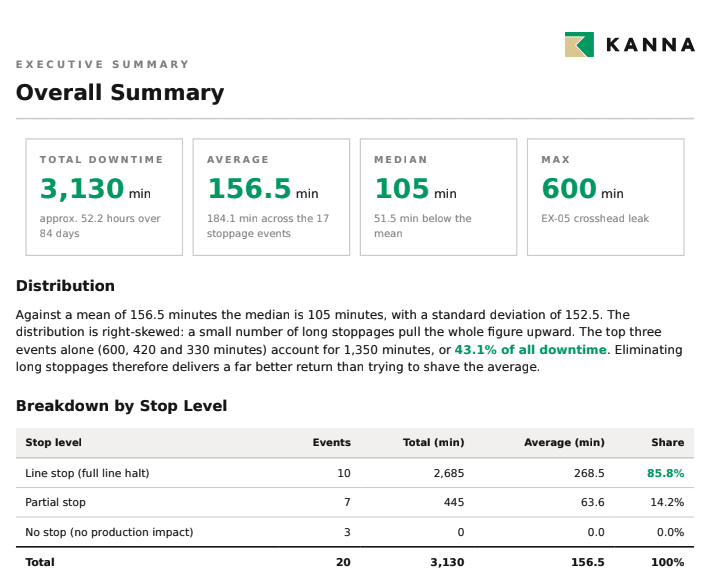
If a machine goes down, production stops. That is the concern behind this use case. KANNA built a simple custom form to capture which machine failed, which technician worked on it, how long it was down, and the type of error involved.

With the Claude connector switched on, that same data becomes a professional report in minutes. Fault types, which asset went down most often, average downtime, monthly trends: all pulled from the custom report data already sitting in KANNA. Nobody has to export anything or build a spreadsheet by hand. Work that used to take a chunk of someone’s week, plus a fair bit of back-and-forth to collate and check, now takes a few clicks and comes out ready to hand to whoever is making the call.
Untangling a complex Gantt chart
One of our clients ran a Gantt chart with a genuinely complicated set of dependencies. Payment processing on certain tasks could not start until specific predecessor tasks were finished, but with that many moving parts, working out which task depended on which had become a headache. It is also the kind of task-level dependency mapping that sits outside what KANNA handles natively.
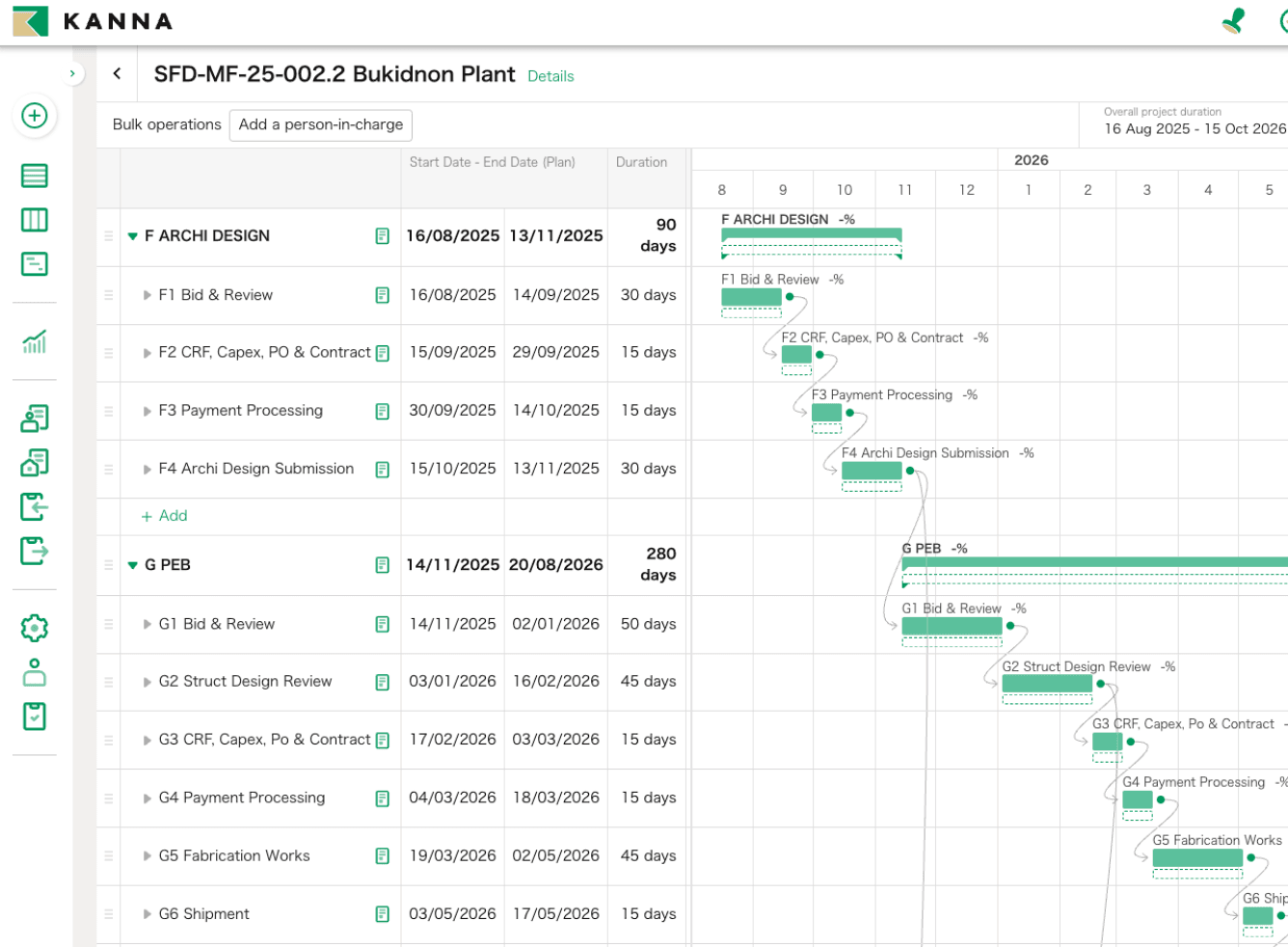
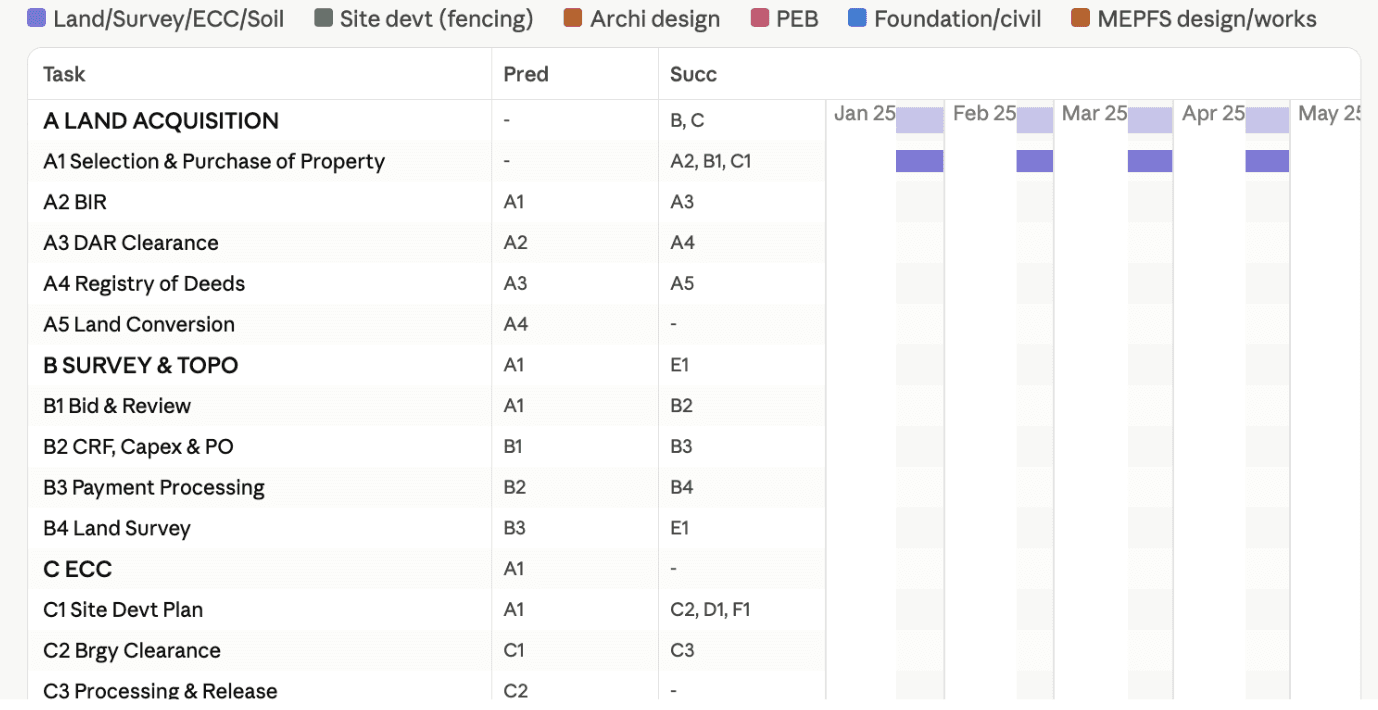
Once the client had the Claude connector enabled, our customer service team asked Claude to go through each task and map out its predecessors and successors in a clear table. Claude worked through the entire chart and handed back a clean breakdown in a matter of minutes.
Not on Claude yet? KANNA still works with you
Everything above centres on Claude because that is where the official MCP connector lives today. If your organisation runs on Microsoft Copilot or ChatGPT instead, you are not locked out. KANNA integrates with both, so the same idea applies: ask your system instead of digging through it. Further integrations are in the pipeline.
Where to start
You already have the data. The question is whether you are still hunting for it, or you have started asking for it directly. Visit the KANNA AI MCP feature page for more information or to book a live demo, or contact your account manager to get the Claude connector switched on for your organisation.
Read more